Posts

Showing posts with the label post production

Extracting QT Text Tracks From Movies to Create Different Caption Formats
Image
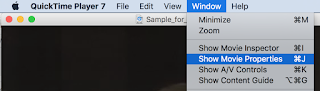
Do you have a QuickTime movie that has a text track, but you need to somehow get the captions out to create another format, such as SRT for YouTube or SCC for broadcast TV or iOS devices? Today's your lucky day. I'll show you how easy it is to repurpose QT Text tracks from movies. First of all, you'll need QuickTime Pro, which is a $30 upgrade to the QuickTime 7 Player from Apple. Open your movie that has the text tracks in it and go to the Window menu and select Show Movie Properties. In the Movie Properties window, select your text track (this one has 2 - one is French and one is English) and then click the Extract button. It will extract the text track into a new movie. Kind of weird to have a movie that is nothing but text, but that's okay. Now we're going to export this movie from QuickTime Pro. Choose Text to Text from the pulldown menu. I've named the new file "french.txt". Once it exports, you'll h...

How to Import CAP Caption Files into MovieCaptioner

Image
A reader recently asked if there was a way to import CAP files into MovieCaptioner. MovieCaptioner currently does not import CAP files directly, but there is a way, thanks to YouTube. As you may know, YouTube can import and display captions. What you may not know is that CAP files (with the .cap file extension) are one of the formats YouTube can accept. YouTube can also accept SRT (what MovieCaptioner uses for the YouTube caption export), SUB, SBV, and MPsub files. So, all you need to do is upload a movie to YouTube or use a movie you already have up there. It does not matter if it's the same movie that the CAP file goes to or how long the movie is. After you have a movie on YouTube, go to YouTube's Video Manager, check the box next to the video you want to edit, and use the pulldown menu next to your video to select Captions. This will take you to a new screen where you will choose your caption file to upload. Just click the Add New Track button and find your CAP file on...